

How to arrange the photos, step by step
Go to "The photos" step. Above the photos you will see the title "Put the story in order", and below it a note that the initial order follows the date each photo was taken. Each photo is numbered in the corner, and the first is marked "First".
Check that the order is right. Photos sent through a messaging app or scanned from an album usually carry no shooting date, so their order may be random. Go through all the numbers from start to finish before you continue.
Move a photo. Drag it with the move icon in the corner, or use the buttons beneath it: "Later" moves it one place toward the end, and "Earlier" moves it one place toward the start. The "Earlier" button is inactive on the first photo.
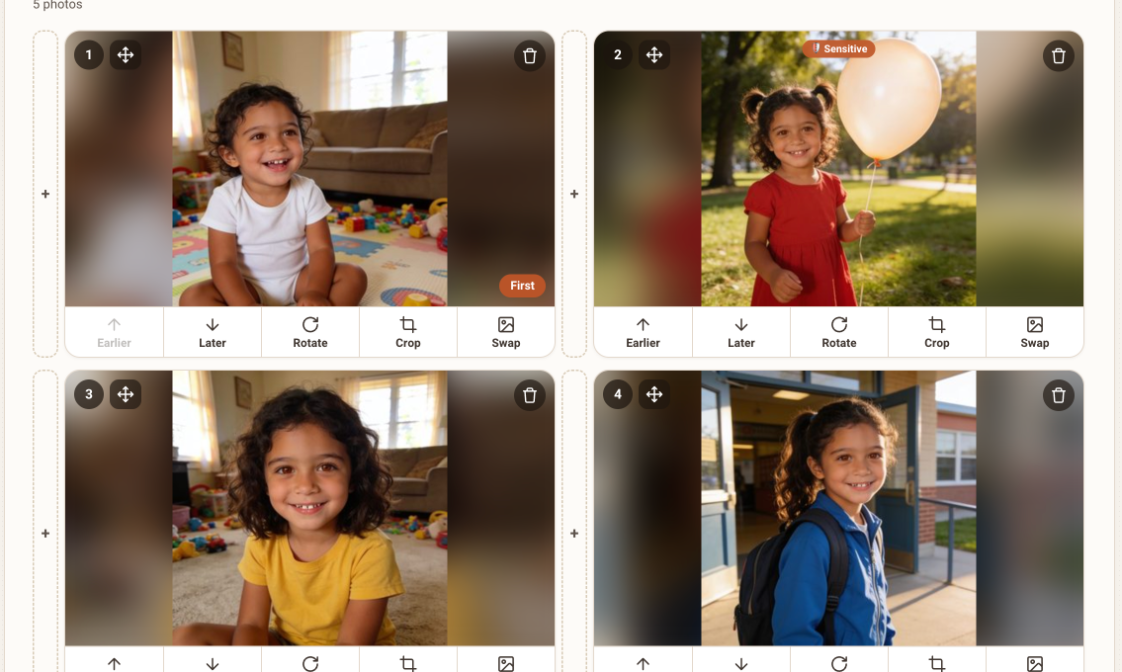
Photo cards with the buttons Earlier, Later, Rotate, Crop and Swap Choose the first photo. In a growing-up film, this is the earliest photo, for example the baby in the first days. In a memories film, choose a strong, bright photo, one that draws the eye at once.
Choose the last photo. This is the photo that stays in the heart. In a growing-up film, the most recent photo of the person. In a memories film, a warm family photo, or one that feels like a happy ending.
Look for jumps. If two neighboring photos are very far apart in time, place or mood, put a linking photo between them. If there isn't one, you can try another version of the transition. The details are in the guide A transition you didn't like.
Film type How to arrange Growing-up film By age, from youngest to oldest, without going back Memories film By theme or event: childhood, wedding, holidays A film about one person From old photos to new, with a strong photo at the end A family film By generation, or by year A big jumpTwo photos far apart in time
 With a linking photoThe story flows
Illustration
A short example
Say you have 24 photos of a girl, from six months to 8 years old. The kindergarten photos were sent in a message and appear at the end of the list, after the school photos. Move them back to their place between ages 3 and 5, and make sure the first photo is of the baby and the last is of the 8-year-old, smiling.
When there are many photos
If you have 50 photos or more, first divide them in your head into small chapters: the infant years, kindergarten, school, the teens. Arrange each chapter on its own, then join them. That makes it easier to see where a linking photo is missing and where there are too many photos of one event. A one-minute film holds about 12 photos, so in a short film each photo has to earn its place.
What to avoid
- Relying on the upload order. It doesn't always reflect the order of time.
- Putting several nearly identical photos in a row. They add nothing to the story.
- Starting or ending with a blurry or dark photo, or a group photo in which the main person is hard to find.
- Leaving the order fixes for last. It is best to arrange before the free preview, so that it shows the story the way you want it.
Frequently asked questions
Can I change the order after the film has been created?
You can go back to the photos step and change the order. Some changes have a number of free tries, and the site shows every limit in advance.
How does the site know the date of a photo?
It reads it from the file itself. A photo that went through a messaging app or a scan usually lacks the date, so it is worth checking the order.
How many photos should I put between two points in time?
There is no fixed rule. One or two photos that link two periods are enough to make the transition feel natural.
Does the order affect the transitions?
Yes. Each transition is built between two neighboring photos, so two photos that are close in time and mood usually give a smoother transition.